
Create and send a one-off voucher to a customer without requiring them to purchase one.
Complimentary vouchers can be used for individual requests, such as a goodwill gesture, service recovery, customer reward or special occasion.
How to Create a Complimentary Voucher
- Go to your voucher dashboard and select the option to create a Complimentary Voucher.
-
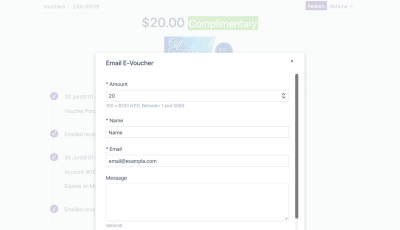
Enter the voucher details:
- Amount — the value of the voucher.
- Name — the name of the voucher recipient.
- Email — the email address where the voucher will be sent.
- Message — the message included with the voucher.
- Select
More Optionsif you need to add additional voucher details.
More Options
Use More Options to enter additional information, including:
- Sender Name — the name shown as the sender of the voucher.
- Gift Recipient — the recipient details used for the voucher.
- Other available voucher information as required.
Review and Send
Review the voucher details before sending. Once the details are correct, send the voucher to the recipient. The voucher will be issued to the email address provided and can then be redeemed according to your voucher settings.